


Texting can be wonderfully simple, but the standard messaging experience often makes every conversation feel equally urgent. That is where Magic SMS - Text Messages caught my attention. It is a free communication app from Snug Apps that keeps the familiar SMS purpose while putting more emphasis on the way messages look and feel. I found it most interesting not as a replacement for every chat service, but as a calmer, more personal space for ordinary texting.
After using it, my main impression is that the app understands something many messaging tools overlook: communication has a rhythm. A quick reply to a delivery driver, a longer exchange with a family member, and a daily check-in with a friend do not need to feel identical. Themes and a more flexible visual presentation can make those conversations easier to recognize and more pleasant to return to, even though the underlying task remains sending and receiving text messages.
That distinction matters. This is not a full social network, a team collaboration platform, or a feature-heavy internet messenger. It is an Android SMS app with a free entry point, an Everyone content rating, and a practical focus on everyday texting. If you want a straightforward way to give your message inbox more personality without abandoning SMS, it deserves a closer look.
Making everyday texting feel less demanding
A familiar purpose with a more personal surface
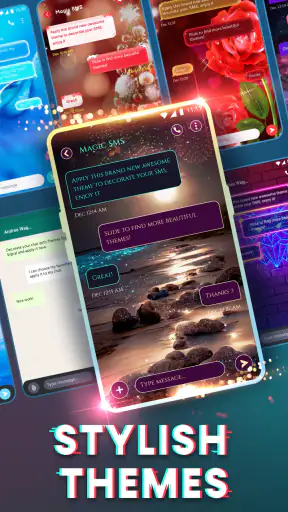
The first thing I appreciated was that Magic SMS does not ask me to rethink what texting is. I can still approach it as the place for short, direct communication: confirming plans, answering a relative, handling a practical question, or sending a message when a richer chat platform would be unnecessary. The difference is in the presentation. Themes give the inbox a warmer identity than the plain, interchangeable appearance I associate with many default messaging tools.
That visual change may sound minor, but it affects how I approach conversations. When every thread looks the same, I tend to open messages mechanically and respond as quickly as possible. A more distinctive appearance can create a small pause before replying. I notice which conversation I am entering, what kind of exchange it usually contains, and whether it really needs an immediate answer. For anyone trying to make texting feel less like a stream of obligations, that is a useful shift.
The app is developed by Snug Apps and has built a substantial audience, with more than a million installs and an average rating of 4.5 from roughly eighteen thousand ratings. Those figures do not make the app perfect, but they suggest that its simple approach connects with plenty of people who want something more expressive than a bare default inbox.
Where it fits in my communication routine
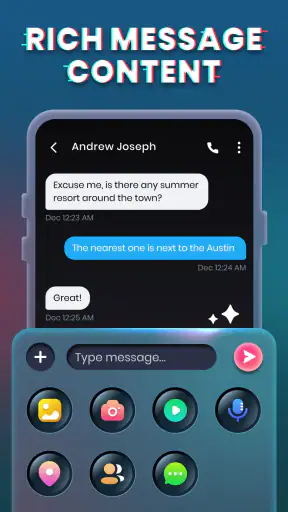
I see Magic SMS working best as a focused SMS home rather than as the one place for all digital communication. When I want to send a message to someone who may not use the same chat service as me, SMS remains useful because it does not depend on convincing that person to join another platform. The app preserves that practical advantage while making my own side of the experience feel less sterile.
A realistic example is a busy weekday when I am moving between errands and work. I might receive a short message about a change of meeting time, a family question, and a reminder from a service provider. Instead of treating all three as part of one noisy feed, I can use the app’s visual customization to make my messaging environment feel more organized and less emotionally flat. I still need to decide when to reply, but the interface does not add unnecessary pressure.
It is also a reasonable choice for someone who prefers SMS because it is direct and widely understood. Older relatives, occasional contacts, and people who avoid installing several chat apps can still be reached through the familiar texting route. Magic SMS does not turn those exchanges into elaborate online conversations; it simply makes the SMS experience more comfortable to live with.
What themes change, and what they cannot change
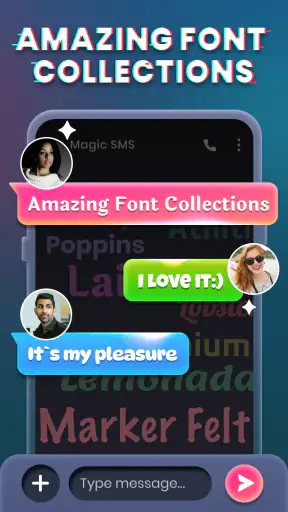
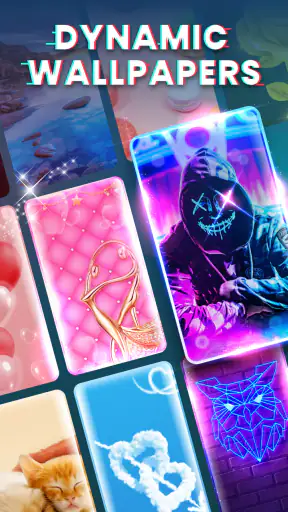
Themes are the app’s clearest personality feature. They can make messages feel more like a space I have chosen rather than a utility screen I have inherited from the phone manufacturer. I found that especially helpful when I wanted a softer, more relaxed visual mood for personal conversations instead of the same businesslike appearance used for every notification.
There is an important trade-off, though. Customization improves recognition and enjoyment, but it can also become visual noise if I choose a style that competes with the words. For texting, readability has to win. A decorative look is only useful when message bubbles, contact details, and controls remain easy to understand at a glance. My advice is to choose a theme for daily comfort, not merely because it looks impressive in a preview.
This is also why the app will not satisfy somebody searching for a complete modern messenger. Themes can alter the mood of the conversation, but they do not turn SMS into an internet chat service with every advanced communication tool. If your friends already coordinate through a platform built around group communities, media sharing, reactions, or synchronized conversations across devices, that platform may remain the better destination for those specific habits.
Following a conversation without losing the thread
Good messaging design is not only about sending a message; it is about understanding what deserves a response and what can wait. Magic SMS helps at the surface level by making the inbox feel more distinct, but I still have to bring my own discipline to the conversation flow. I found it useful to treat the app as a place for deliberate replies rather than an automatic command center for every interruption.
For example, when a message arrives while I am concentrating, I can read it as a request for attention rather than a demand for instant action. The visual identity of the app makes the message environment pleasant, but it does not encourage me to keep checking endlessly. In that sense, the app works best when paired with a simple personal rule: open a thread when I am ready to respond, not every time the phone invites me to look.
That approach is particularly helpful in longer family conversations. SMS threads can become scattered when several small questions arrive close together. I found that writing one clear reply that answers each point is better than sending a series of rushed fragments. The app’s straightforward purpose supports that habit because it keeps the focus on the conversation itself instead of surrounding it with distracting extras.
Why a themed inbox can affect attention
There is a subtle tension in any customization-focused app. A more attractive interface can make communication easier to enjoy, but it can also encourage me to spend more time browsing messages than I intended. Magic SMS changed the emotional tone of my inbox, yet that does not automatically make my attention more protected. If anything, a pleasant design makes it important to decide what I am opening the app to do.
I recommend using it with a clear task in mind. If I open the app to answer a single question, I try to answer that question and leave rather than drifting through old threads. If I am catching up with a friend, I give that exchange proper time instead of half-reading it between other activities. The app can support a healthier communication rhythm, but it cannot create boundaries on my behalf.
This is one of the more useful ways to judge the product. Someone who wants every message to trigger a rich, engaging interaction may enjoy the customization. Someone who is trying to reduce phone checking should remember that a nicer inbox is still an inbox. The benefit comes from making texting more intentional, not from making it more addictive.
Keeping personal boundaries around replies
SMS has a reputation for being immediate, even when the message itself is not urgent. Magic SMS made me think more carefully about that assumption. The app is well suited to setting a personal communication window: I can check messages at a time that works for me, respond clearly, and avoid turning every incoming text into an interruption.
That is especially valuable for contacts who send brief follow-ups such as “Are you there?” or “Can you answer?” A themed messaging environment does not solve the social pressure, but it gives me a more conscious place to handle it. I can reply when I have enough attention to be useful instead of sending a rushed answer that creates another round of clarification.
My practical tip is to use different visual choices for different kinds of conversations only if the result remains easy to read. A familiar appearance for practical threads and a more personal style for close contacts can help me recognize context quickly. However, I would avoid making the system too elaborate. If I spend more time managing themes than replying to people, the customization has stopped serving its purpose.
Free access and the question of extras
Magic SMS is free to install and use as an entry-level option, which makes it easy to test without committing money first. The app includes in-app purchases ranging from $0.99 to $26.99 per item. That means I would explore the basic experience before buying anything and decide whether additional personalization genuinely improves my routine.
For me, the right question is not whether every available extra is attractive. It is whether the chosen look helps me read conversations comfortably and recognize the kind of attention they need. If the free experience already gives me a usable SMS environment, spending is optional rather than necessary for understanding the app’s main idea.
This pricing structure may appeal to people who enjoy customizing their phone gradually, but it may frustrate users who expect a completely open theme library at no cost. I would also be cautious about buying several decorative items before living with one design for a few days. A theme that feels exciting at first may prove tiring during ordinary morning and evening texting.
How it compares with default messaging and internet chat apps
Compared with the messaging app that comes preinstalled on an Android phone, Magic SMS offers a stronger sense of ownership over the visual experience. The default option is often perfectly functional, but it can feel anonymous. If the main reason for changing apps is that the standard inbox looks dull or impersonal, this product has a clear advantage.
Compared with internet-based messengers, the comparison is more complicated. Services built around online accounts usually offer richer ways to share media, coordinate groups, and continue conversations across multiple devices. They may be the better choice for active communities, work teams, or friends who already spend most of their time in one shared platform. Magic SMS is more appealing when compatibility and directness matter more than a large feature set.
There is also a social consideration. A themed SMS app changes my experience, but the other person may see the message through an entirely different application. That makes the customization personal rather than shared. I like that independence, because I do not need to persuade anyone else to install the same tool, but users looking for a matching visual experience on both sides may prefer a platform where everyone uses the same service.
Who should try it, and who should skip it
I would recommend Magic SMS to Android users who send regular text messages and feel that their current inbox is too plain, too mechanical, or difficult to make their own. It also suits people who want a direct way to reach contacts outside their usual chat ecosystem. The Everyone rating makes it approachable for a broad audience, including households that want a straightforward texting tool rather than a social network.
It is a particularly good fit for someone who values small environmental changes. You may not need a dozen new functions; perhaps you simply want your conversations to feel more recognizable and less like a list of administrative tasks. In that situation, the app’s emphasis on themes has a real emotional benefit.
I would skip it if your priority is advanced cross-platform messaging, large online groups, or a unified archive of conversations from several services. I would also skip it if you are perfectly happy with your existing SMS app and do not care about appearance. Switching apps adds a little adjustment, and customization alone is not a strong enough reason for everyone to change a reliable setup.
Practical questions before making it your daily inbox
One question many people will have is whether it is suitable for ordinary, non-technical users. In my view, yes, provided they already understand basic texting. The app’s purpose is narrow enough to be approachable, and the themes are an optional layer rather than a new communication system to learn. I would still spend a few minutes choosing a readable design and checking that the overall layout feels comfortable before encouraging a less confident phone user to adopt it.
Another question is whether the app changes how other people receive messages. The answer, in practical terms, is that its main effect is on my side of the exchange. The recipient does not need to share the same themed interface for me to send a normal text. That makes adoption easier than with a closed chat service, although it also means the visual customization is not a shared conversation feature.
People may also wonder whether it is worth paying for optional items. I would wait. Use the free experience during several different kinds of conversations: quick practical replies, personal chats, and messages received during a busy day. If the visual choices genuinely improve recognition and reduce friction, an optional purchase may feel reasonable. If the app already does what you need, there is no reason to buy extras simply to make the inbox busier.
Finally, consider the version and device requirements when deciding whether to try it. The current version is 1.3.4.51, and it supports Android 6.0 and later. That gives owners of older compatible Android phones a chance to use it without needing a recent flagship device, while users on unsupported systems will need to stay with another messaging option.
My verdict on the communication rhythm
After spending time with Magic SMS, I see its value less in dramatic new capabilities and more in the way it changes the atmosphere around texting. It makes the inbox feel chosen instead of inherited. That can encourage clearer replies, more deliberate checking, and a little more separation between urgent communication and messages that can wait.
The limitations are just as clear. It remains a focused SMS app, so it is not the right answer for people who want a full online messenger with a broad social feature set. Themes can also become distracting, and a pleasant interface does not automatically protect attention. The app works best when I use its customization to support my habits rather than letting the customization dictate them.
For my own use, I would recommend it to a friend who wants texting to feel more personal without asking every contact to join another service. The free starting point makes trying it low-risk, while the optional purchases leave room for people who enjoy deeper personalization. If your goal is calmer, clearer everyday texting rather than more digital noise, Magic SMS is a thoughtful upgrade to consider.
Snug Apps has kept the idea focused: give ordinary SMS conversations a more individual setting and let the user decide how much personality to add. With a 4.5 average and around eighteen thousand ratings, it has clearly found an audience for that approach. I would not call it a universal replacement for every messaging tool, but for Android users who want their communication space to feel less generic and more intentional, Magic SMS - Text Messages is an easy app to understand and a surprisingly meaningful one to keep.


